Saturday, 10 October 2015

Patching


Patch:
======
A Patch which fixes a bug (or) enhance/add a particular feature in existing program.

Why patches require in oracle ebs?

Patches may be required to resolve problem wth application code,to fix production issues,to install new feature
to upgrade components of the technology stack.

Patches is of two types

1)(Opatch) to apply database patches
2)(adpatch) to apply application patches.

Naming convention of patch
============================
1)<p><number>_11i_<platform>

 <number>=7 digits

exmple: p1234567_r12_LINUX.Zip

2)P1234567_11i_GENERIC.Zip

Note: Generic indicates on all platform we can apply this patch.


Types of patch in oracle application
====================================

One of patch
=============

A patch that doesnot depends upon another patch .
one of patches fixes one or more bugs for a single product.
one of patches may or may not have the pre requisites.
These patches are small in size.
They often called as standalone patches.

Mini Pack:
=========
A mini pack is one which will upgrade any product patch set level to next level .

or

Collection of one -off patches and enhancement related to particular module.
All bug fixes related to one product which will change the patchset level of
specific product.

Minipack version is denoted by alphabetic characters.

patch+patch=Minipack

 <11i>_<product>_<minipack level>

Example: 11i.FND.H
         11I.GL.I
         11i.GL.H.1


Rollup patches
=============

 A rollup patch is one which will deliver bug fixes identified after the release of any major application versions like 11.5.8/11.5.9.


Family pack
===========
A Family pack is one which will upgrade the patch set level of all the products in that family to particular patchsetlevel.

(OR)

Collection of minipack patches for a particular family group of application modules.

Some of the families in oracle Apps are:

 FIN == GL,AR,AP,FA

 ATG == AD,FNDAU,WF

Family pack patches will change entire product family.

product Minipack+product Minipack= Family pack.

Naming convention of family pack patch:
========================================

<Family name>_PF.<CODE LEVEL>

Example:HR_PF.J
        GL_PF.K


Maintainance pack patch
============================
Group of family pack is called Maintainance pack patch.

A maintenance pack will upgrade applications from one version to another like 11.5.8 to 11.5.9.


 consolidated  patches.
===================
Consolidated patches will come into pictures after upgrades from one
version of applications to another, all post upgrade patches will a consolidated
and given as consolidated patch.


PATCH ARCHTECTURE
================
Suppose this is the patch number 1234567.
Example:P<1234567>_R12_LINUX.zip

A patch contains three things.

1)Directory with the patch number like here in this case 1234567.inside you will find below files.

2)README.txt or README.html

3)Driver files
c<patch number>.drv
d<patch number>.drv
g<patch number>.drv

u<patch number>.drv  it is ther in updated versions.


What happens when we unzip a patch?
===========================

unzip P<1234567>_R12_LINUX.zip

When we unzip a patch it create a base directory with the patch number like 1234567.
it contains all patch related files .in this directory there is a file README.txt or README.html
which contains instruction how to apply a patch and also it contain patch number,product,release
and platform.if patch is too long it contain document id which helps us to apply a patch.
it also contain driver files.

c<patch number>.drv
====================
Copies the files that are there in patch to the APPL_TOP
Extracts the appropriate files from each product c library.
Re-links the oracle application product.

Compares the files in the patch with those in the APPL_TOP,if the files in the patch are a higher
version,then adpatch copies the files from patch to APPL_TOP

d<patch number>.drv
===================
The database driver contains all commands to change the database objects.In multi node installation d driver runs
from the admin server.The database driver applies all script copied by the copy driver to the database.

==> Make a list of all invalid objects in the database.
==>Run sql scripts,which make changes to the database.(Packages,procedures and etc).
==>Compile all the invalid objects that are there in the database.

g<patch number>.drv
==================

Regenerate all forms,reports and PL/SQL libraries that have been effected by the patch.

u<patch number>.drv
===================
It is combination of all three drivers c,d and g.The action of each driver is performed by u driver.


Who will created the patches?

Patches are created by oracle whenever there are enahancement in its application or there are any problem with the exists ones.


***************************************************************************

How to apply a patch in oracle ebs suite?
============================

check patch is applied or not if not download from metalink
===========================================================
select bug_number,creation_date from apps.ad_bugs where bug_number='&bug_number';

check how many langagues are installed
=======================================

col LANGUAGE_CODE for a20
col NLS_LANGUAGE for a20
select NLS_LANGUAGE,LANGUAGE_CODE,INSTALLED_FLAG from apps.fnd_languages where INSTALLED_FLAG in('B','I');
NLS_LANGUAGE LANGUAGE_CODE INS
-------------------- -------------------- ---
AMERICAN US B
BRAZILIAN PORTUGUESE PTB I

OR
cd $AU_TOP/forms
Invalid objects before applying the patch
=======================
select count(*) from dba_objects where status='INVALID';
25
Backuping the invalids object before applying the patch
====================================================
create table dba_objects_18apr2013 AS select * from dba_objects where status='INVALID';

if you have multiple patches Please merge it by using below command
====================================================================
Go to patch directory and create below directories
cd /u01/ebsapp/patches/CTASK0214234
mkdir before after
chmod 777 *
Now merge patch using below command
===================================
You should fire this command from CTASK0214234.
ls -trl /u01/ebsapp/patches/CTASK0214234/before/*.zip|awk '{print $NF}' > patch_list
admrgpch -s before -d after -merge_name 0214234 -manifest patch_list
above command merge the patch and go to after directory you will find merge driver file.

send outage communication/Put mail to business
============================================
Bring down middle tier/apps tier services
11i==============>cd $COMMON_TOP/admin/scripts/$CONTEXT_NAME
r12==============>cd $INST_TOP/admin/scripts
ps -fu applmgr|grep -i http


if it is shared application file system
========================================
you have to bring down admin tier service i.e, concurrent node it depends on business requirement.
ps -fu applmgr|grep -i FND|wc -l
if processes not went down do kill processes and proceed ahead
===============================================================
kill -9 procid

Enable the maintanace mode
===========================
sqlplus -s apps/******** @$AD_TOP/patch/115/sql/adsetmmd.sql ENABLE
To check maintanace mode enable or not use below query
=======================================================
select fnd_profile.value('APPS_MAINTENANCE_MODE') from dual;


Now fire adpatch from VNC server as its process will be created on the server.
You can also use putty session but this process will run at client side.Putty
session will be inactive after 30 mins.if your patch taking more than 30 mins
your session will gone.you have to start adpatch from the start.

So its better practice to use VNC.


FIRE :adpatch
as adpatch will ask for some questions like logfile name,system,apps,ORACLE_HOME,number worker,driver file
once the patch is applied successfully.Please check the logfile for errors and warnings.

To check adpatch log
cd $APPL_TOP/admin/$TWO_TASK/log.


grep -i errors $APPL_TOP/admin/$TWO_TASK/log/0214234.log
grep -i warnings $APPL_TOP/admin/$TWO_TASK/log/0214234.log

Please check whether patch is applied or not.
===============================================
select bug_number,creation_date from ad_bugs where bug_number='5968480';
BUG_NUMBER CREATION_DATE
------------------------------ ---------------
14072764 18-APR-12

Disable the maintainance mode
=========================================
sqlplus -s apps/****** @$AD_TOP/patch/115/sql/adsetmmd.sql DISABLE


To check maintanace mode enable or not use below query
=======================================================
select fnd_profile.value('APPS_MAINTENANCE_MODE') from dual;


Up the DT services and then AT services
======================================
11i==============>cd $COMMON_TOP/admin/scripts/$CONTEXT_NAME
R12==============>cd $INST_TOP/admin/scripts (OR) $ADMIN_SCRIPTS_HOME

do sanity check and release instance for user access .
http://appoltp.user.com:8011/OA_HTML/AppsLocalLogin.jsp
In sanity check you will sumbit below to requests

Go to System adminstrator --->Request--->Run

1)Active User =====>Check View LOG/vIEW OUT
2)Active Responsiblity ===>Check View LOG/vIEW OUT


Invalid objects after applying the patch
=========================================
SQL> select count(*) from dba_objects where status='INVALID';
COUNT(*)
----------
16
Backuping the invalids object after applying the patch
====================================================
SQL> create table dba_objects_18apr2012_after AS select * from dba_objects where status='INVALID';
Table created.


To find new invalid objects
============================
SQL> select count(1) from dba_objects where object_id not in (select object_id from dba_objects_18apr2013) and status='INVALID';
COUNT(1)
----------
0
SQL>


***************************************************************


Merging patches
==============

Merging multiple patches into one patch is said to be merge patch.

We can merge language patches,pre-requisite and co -requisite patche into one patch.

Don't merge RDBMS patch with apps patch.

Don't merge patches of different version (11.5.x, 12.1).

Don't merge ATG family product patches.


PATCHES MODE
============

We can apply adpatch in four modes.They are

1)Interactive
2)Non - Interactive
3)Pre-install mode
4)Test  mode


1)Interactive *:-
==============

Providing all the inputs at the time of applying a patch.

2)Non - Interactive *:-
====================
Providing  the inputs for adpatch in a file is said to be Non-interactive mode.

It is a text file.

Location of the defaluts file is $APPL_TOP/admin/<SID>

While working with defaults file for the first time we need to provide all the inputs.From next time onwards
we have to provide only limited information like Patch location,driver file,patch log file and number of works.


Example:
===========

$adpatch defaultsfile=/u01/erpapp/appl/admin/ebsofdb/adpatchdef.txt

From next time onwards no need to provide all the inputs,its enough to provide below inputs.
1)Logfile
2)Patch directory location
3)Driver file
4)Workers

Advantage: Reduce patch timing.


3)Pre-install mode *--
====================
In this mode,Only copy portion is applied.('C' Driver is applied)
Database portion and generate portion will not be executed.('D' and 'G' Driver will  not be executed).
Default it is set to no adpatch preinstall=n
This would be done normally during an upgrade or consolidated update. When a patch is applied in a preinstall mode then all the AD utilities are updated before the upgrade or update.

if you wish to apply a patch in preinstall mode then use below syntax.

$adpatch preinstall=y


4)Test  mode * :-
===============
BY using this mode,We can see the effects of applying this patch will have on your system before applying the patch.

The default is adpatch apply=y.

If you want to apply a patch in test mode follow below syntax.

Syntax: adpatch apply=no


in this mode just file comparision will be done between PATCH_TOP and APPL_TOP and that will be reported in .lgi file.
It is located under $APPL_TOP/adminn/<SID>/log/adpatch.lgi


Advantage: Will get to know what patch is doing before applying the patch on our system.


++++++++++++++++++++++++++++++++++++++++++++++++++++++++++++
                                     Adpatch options
++++++++++++++++++++++++++++++++++++++++++++++++++++++++++++

To change the default behaviour of patching ,we can use below options.

Non default
======            
nocopyportion
nodatabaseportion
nogenerateportion
nocompiledb
nocompilejsp
novalidate
nomaintainancemrc
noautoconfig
hotpatch


default
======
copyportion
databaseportion
generateportion
compiledb
compilejsp
validate
maintainancemrc
autoconfig
nohotpatch


Checkfile *:-
==========
The checkfile option of adpatch tells adpathc to check for already executed exec, SQL, and exectier commands. this can cause performance overheds so should be used only when specified.

$adpatch options=nocheckfile


compiledb *:-
============
Purpose: To compile invalid objects in the database after running actions in the database driver.
Default: compiledb (use ‘nocompiledb’ to skip)


compilejsp *:-
===========
Purpose: To compile out-of-date JSP files, if the patch has copy actions for at least one JSP file.
Default: compilejsp (use’nocompilejsp’ to skip)


copyportion*:-
============
Purpose: To run commands found in a copy driver. This will copy the higher version files from patch to product top.
Default: copyportion (Use ‘nocopyportion’ to skip. Use it only when mentioned in readme of patch)


databaseportion * :-
================
Purpose: To run commands found in a database driver. This portion includes applying the files (like sql, pls etc) to database.
Default: databaseportion (use ‘nodatabaseportion’ to skip. Use it only when mentioned in readme of patch).


generateportion *:-
===================

Purpose: To run commands found in a generate driver. This portion will generate new executable files from the copied code of patch. For example if will generate new forms files (fmx) from new .fmb files.
Default: generateportion (use ‘nogenerateporation’ to skip).

$adpatch options=nogenform
$adpatch options=nogenrep

integrity *:-
=============
Purpose: To perform patch integrity checking. Tells adpatch whether to perform patch integrity checking, which verifies that the version of each file referenced in a copy action matches the version present in the patch.
Default: nointegrity (By default the integrity is not checked)

$adpatch options=integrity

maintainmrc *:-
==============
Purpose: To maintain the MRC schema after running actions found in the database driver.
Default: maintainmrc (use ‘nomaintainmrc’ to skip)


autoconfig *:-
==============
Purpose: Tells adpatch to run Autoconfig after patch installation.
Default: autoconfig (use ‘noautoconfig’ to skip)


parallel * :-
=============
Purpose: To run actions that update the database or actions (like SQL) that generate files in parallel (like genform).


prereq *:-
==========
Purpose: Tells adpatch whether to perform prerequisite patch checking prior to running patch driver files that contain actions normally found in the copy driver.
Default: prereq (use ‘noprereq’ to skip)

$adpatch options=noprereq

validate *:-
=============
Purpose: To connect to all registered Oracle Applications schemas at the start of the patch. Adpatch validates the passwords for each schema.
Default: novalidate (use ‘validate’ to validate schema passwords)
Default: parallel (use ‘noparallel’ to skip)


Java Classes * :-
=============
If you wish adpatch not to copy new java classes from the patch .By default java classes are copied.

$adpatch options=nojcopy


Relinking *:-
===========
If you wish adpatch not do perform relinking you can use options=nolink.


Force Copy *:-
============
By default adpatch copies the files without check the version of the existing files already present on the system.If you do  not wish the newer version of the file to be replaced by the older version contained in the patch use options=noforcecopy.

$adpatch options=noforcecopy.


You could specify multiple options at the command line using the , delimiter.
=============================================================================
$adpatch options=nocompiledb,nocompilejsp,nojcopy


Following flags can be passed to adpatch
1) hidepw
Purpose: This argument is used to hide the passwords in log files
Default: nohidepw
2) trace
Purpose: Tells the adpatch utility whether to log all database operations to a trace file
Default: notrace
3) logging
Purpose: Tells the adpatch utility whether to create indexes using the logging or nologging mode.


What two tables adpatch creates when you apply or run adpatch session ?
FND_INSTALL_PROCESSES , AD_DEFERRED_JOBS

Tuesday, 6 October 2015

Step-by-Step Cloning Oracle Database - Cold Cloning, Hot Cloning

 Cloning Oracle Database - Cold Cloning, Hot Cloning

Clone an Oracle Database using Cold Physical Backup
Database Name: rep
clone database: (stgsrv)
Cold Backup Steps:
1. Get the file path information using below query
Select name from v$datafile;
select member from v$logfile;
select name from v$controlfile;
2. Parameter file backup
If rep database running on spfile
Create pfile=’/u01/backup/initstgsrv.ora’ from spfile;
If database running in pfile using os command to copy the pfile and placed in backup path.
3.Taken the control file backup
Alter database backup controlfile to trace as ‘/u01/backup/control01.ora’;
4.Shutdown immediate
5.Copy all the data files/log files using os command & placed in backup path.
6.Startup the database.

Clone Database side: (stgsrv database)
Database Name: stgsrv
Clone Database Steps:
1.Create the appropriate folder in corresponding path & placed the backup files in corresponding folder.(bdump,udump,create,pfile,cdump,oradata)
2.Change the init.ora parameter like control file path, dbname, instance name etc...
3.Create the password file using orapwd utility.
(Database in windows we need to create the service id using oradim utility)
4.Startup the Database in NOMOUNT stage.
5.Create the control file for cloning database.
Using backup controlfile trace to generate the create controlfile scripts.
Change the Database name & files path, also change 'REUSE' needs to be changed to 'SET'.

CREATE CONTROLFILE SET DATABASE "stgsrv" RESETLOGS FORCE LOGGING NOARCHIVELOG
MAXLOGFILES 50
MAXLOGMEMBERS 5
MAXDATAFILES 100
MAXINSTANCES 1
MAXLOGHISTORY 453
LOGFILE
GROUP 1 '/U01/oradata/stgsrv/redo01.log' SIZE 200M,
GROUP 2 '/U01/oradata/stgsrv/redo02.log' SIZE 200M,
GROUP 3 '/U01/oradata/stgsrv/redo03.log' SIZE 200M
DATAFILE
'/U01/oradata/stgsrv/system01.dbf',
'/U01/oradata/stgsrv/undotbs01.dbf',
'/U01/oradata/stgsrv/users01.dbf',
CHARACTER SET WE8ISO8859P1;
Note: placed the script in sql prompt. Now controlfile created.
6.Now open the database.
Alter database open resetlogs;
Note: Check the logfile, datafiles & instance status
**********************************************************************************
Clone an Oracle Database using Hot Physical Backup
Database Name: rep
Database must be in Archive log mode.
Source Database side: (rep database)
Hot Backup Steps:
1.Get the file path information using below query.
Select tablespace_name, file_name from dba_data_files order by 1;
2. Parameter file backup
If troy database running on spfile
Create pfile=’/u01/backup/initrep.ora’ from spfile;
If database running in pfile using os command to copy the pfile and placed in backup path.
3.Put the tablespace in begin backup mode Using os command to copy the datafiles belongs to begin backup mode tablespace & placed in backup path. (Refer below example)
4.Once copied the datafile, release the tablespace from begin backup mode to end backup
5.Repeat the steps 1-3 for all your tablespaces.
6.Taken the controlfile backup
Alter database backup controlfile to trace as ‘/u01/backup/control01.ora’;
7.Backup all your archive log files between the previous backup and the new backup as well.
Example:
steps:
2.Alter tablespace system begin backup;
To ensure the begin backup mode tablespace using below query
Select * from v$backup; (refer the Change#, Time column)
3. Host cp /u01/oracle/rep/system1.DBF /u01/backup/system01.dbf à using os command to copy the datafile.
4. Alter tablespace system end backup;
To ensure the begin backup mode tablespace using below query
Select * from v$backup;

Clone Database side: (stgsrv database)
Database Name: stgsrv(clone)
Clone Database Steps:
1.Create the appropriate folder in corresponding path & placed the backup files in corresponding folder.(bdump,udump,create,pfile,cdump,oradata)
2.Change the init.ora parameter like control file path, dbname, instance name etc...
3.Create the password file using orapwd utility.
(Database in windows we need to create the service id using oradim utility)
4.Startup the Database in NOMOUNT stage.

5.Create the control file for cloning database.
Using backup controlfile trace to generate the create controlfile scripts.
Change the Database name & files path, also change 'REUSE' needs to be changed to 'SET'.

CREATE CONTROLFILE SET DATABASE "stgsrv" RESETLOGS FORCE LOGGING NOARCHIVELOG
MAXLOGFILES 50
MAXLOGMEMBERS 5
MAXDATAFILES 100
MAXINSTANCES 1
MAXLOGHISTORY 453
LOGFILE
GROUP 1 '/U01/oradata/stgsrv/redo01.log' SIZE 200M,
GROUP 2 '/U01/oradata/stgsrv/redo02.log' SIZE 200M,
GROUP 3 '/U01/oradata/stgsrv/redo03.log' SIZE 200M
DATAFILE
'/U01/oradata/stgsrv/system01.dbf',
'/U01/oradata/stgsrv/undotbs01.dbf',
'/U01/oradata/stgsrv/users01.dbf',
CHARACTER SET WE8ISO8859P1;
Note: placed the script in sql prompt. Now controlfile created.
6.Recover the database using controlfile.
Recover database using backup controlfile until cancel;
7.Now open the database.
Alter database open resetlogs;
Note: Check the logfile, datafiles status.
I Hope this article helped you to understand the cloning oracle database.Suggestions are welcome.

Wednesday, 18 February 2015

Upgrade Oracle EBS R12.2.0 to R12.2.4


The latest available version of  Oracle E-Business suite is R12.2.0 and the latest available. In this article I will demonstrate upgrading Oracle EBS from R12.2.0 to R12.2.4.

This post will be helpful for those who are performing a fresh Installation and planning to upgrade it  to R12.2.4. The latest available version of start CD is R12.2.0.48 and it can be downloaded via patch "Patch 18086193 "

If you Install Oracle EBS using start CD R12.2.0.48 then you need to Install minimum number of patches in order to upgrade to R12.2.4

The below upgrade has been performed on a virtual machine configured with 12GB RAM and 6 core processors.

Environment: Oracle Enterprise Linux 5.7 (64-Bit)
EBS Version :  Oracle EBS R12.2.0 (using start CD 12.2.0.48)

The following are the list of patches need to be Installed on Oracle EBS Tech Stack components before proceeding with the upgrade:


If used other version of start CD during Installation then there will be some other patches you need to Install before proceeding with the upgrade. The above list of patches are applicable and only available pre-requisites currently. This list might get also change in future. So please refer MOS tech note "Oracle E-Business Suite Release 12.2: Consolidated List of Patches and Technology Bug Fixes (Doc ID 1594274.1)"  to check for latest updates,

These patch number are specific to Linux-64 bit. Different OS will have different patch numbers. So please refer above listed tech note.


For fresh Installation of R12.2  refer:

http://karunadba.blogspot.in/2015/02/oracle-applications-r12.html

For using start CD R12.2.0.48 refer:

http://karunadba.blogspot.in/2015/02/preparing-start-cd-12.html


References:

- Oracle E-Business Suite Release 12.2.4 Readme (Doc ID 1617458.1)

- Oracle E-Business Suite Release 12.2: Consolidated List of Patches and Technology Bug Fixes (Doc ID 1594274.1)

- Oracle E-Business Suite 12.2 Patching Technology Components Guide (Doc ID 1355068.1)

Applying the Latest AD and TXK Release Update Packs to Oracle E-Business Suite Release 12.2 (Doc ID 1617461.1)

R12.2: How To Create the Stage In Preparation For Installation (Doc ID 1596433.1)

R12.2.4 Upgrade Steps:

  • Prepare for upgrade
  • Upgrade 
  • Post upgrade


>>> Prepare for Upgrade:


1 - Install Oracle RDBMS patches:

Perform backup of database and RDBMS Oracle_Home before applying these patches.


[oraebs@erpnode3 16989137]$ opatch apply
Oracle Interim Patch Installer version 11.2.0.3.0
Copyright (c) 2012, Oracle Corporation.  All rights reserved.


Oracle Home       : /u01/ora_test/11.2.0
Central Inventory : /u01/ora_prod/oraInventory
   from           : /u01/ora_test/11.2.0/oraInst.loc
OPatch version    : 11.2.0.3.0
OUI version       : 11.2.0.3.0
Log file location : /u01/ora_test/11.2.0/cfgtoollogs/opatch/16989137_Oct_28_2014_14_29_47/apply2014-10-28_14-29-47PM_1.log

Applying interim patch '16989137' to OH '/u01/ora_test/11.2.0'
Verifying environment and performing prerequisite checks...
All checks passed.
Provide your email address to be informed of security issues, install and
initiate Oracle Configuration Manager. Easier for you if you use your My
Oracle Support Email address/User Name.
Visit http://www.oracle.com/support/policies.html for details.
Email address/User Name: 

You have not provided an email address for notification of security issues.
Do you wish to remain uninformed of security issues (Yeses, Noo) No:  Y
Backing up files...

Patching component oracle.ctx, 11.2.0.3.0...

Patching component oracle.rdbms.dbscripts, 11.2.0.3.0...

Verifying the update...
Patch 16989137 successfully applied
Log file location: /u01/ora_test/11.2.0/cfgtoollogs/opatch/16989137_Oct_28_2014_14_29_47/apply2014-10-28_14-29-47PM_1.log

OPatch succeeded.
[oraebs@erpnode3 16989137]$ 


[oraebs@erpnode3 17875948]$ opatch apply
Oracle Interim Patch Installer version 11.2.0.3.0
Copyright (c) 2012, Oracle Corporation.  All rights reserved.


Oracle Home       : /u01/ora_test/11.2.0
Central Inventory : /u01/ora_prod/oraInventory
   from           : /u01/ora_test/11.2.0/oraInst.loc
OPatch version    : 11.2.0.3.0
OUI version       : 11.2.0.3.0
Log file location : /u01/ora_test/11.2.0/cfgtoollogs/opatch/17875948_Oct_28_2014_14_33_15/apply2014-10-28_14-33-15PM_1.log

Applying interim patch '17875948' to OH '/u01/ora_test/11.2.0'
Verifying environment and performing prerequisite checks...
Interim patch 17875948 is a superset of the patch(es) [  16587934 ] in the Oracle Home
OPatch will roll back the subset patches and apply the given patch.
All checks passed.
Provide your email address to be informed of security issues, install and
initiate Oracle Configuration Manager. Easier for you if you use your My
Oracle Support Email address/User Name.
Visit http://www.oracle.com/support/policies.html for details.
Email address/User Name: 

You have not provided an email address for notification of security issues.
Do you wish to remain uninformed of security issues (Yeses, Noo) No:  Y

Please shutdown Oracle instances running out of this ORACLE_HOME on the local system.
(Oracle Home = '/u01/ora_test/11.2.0')


Is the local system ready for patching? [y|n]
y
User Responded with: Y
Backing up files...
Rolling back interim patch '16587934' from OH '/u01/ora_test/11.2.0'

Patching component oracle.rdbms, 11.2.0.3.0...

Patching component oracle.rdbms.dbscripts, 11.2.0.3.0...
RollbackSession removing interim patch '16587934' from inventory


OPatch back to application of the patch '17875948' after auto-rollback.


Patching component oracle.rdbms, 11.2.0.3.0...

Patching component oracle.rdbms.dbscripts, 11.2.0.3.0...

Verifying the update...
Patch 17875948 successfully applied
Log file location: /u01/ora_test/11.2.0/cfgtoollogs/opatch/17875948_Oct_28_2014_14_33_15/apply2014-10-28_14-33-15PM_1.log

OPatch succeeded.
[oraebs@erpnode3 17875948]$ 


[oraebs@erpnode3 17912217]$ opatch apply
Oracle Interim Patch Installer version 11.2.0.3.0
Copyright (c) 2012, Oracle Corporation.  All rights reserved.


Oracle Home       : /u01/ora_test/11.2.0
Central Inventory : /u01/ora_prod/oraInventory
   from           : /u01/ora_test/11.2.0/oraInst.loc
OPatch version    : 11.2.0.3.0
OUI version       : 11.2.0.3.0
Log file location : /u01/ora_test/11.2.0/cfgtoollogs/opatch/17912217_Oct_28_2014_14_38_04/apply2014-10-28_14-38-04PM_1.log

Applying interim patch '17912217' to OH '/u01/ora_test/11.2.0'
Verifying environment and performing prerequisite checks...
All checks passed.
Provide your email address to be informed of security issues, install and
initiate Oracle Configuration Manager. Easier for you if you use your My
Oracle Support Email address/User Name.
Visit http://www.oracle.com/support/policies.html for details.
Email address/User Name: 

You have not provided an email address for notification of security issues.
Do you wish to remain uninformed of security issues (Yeses, Noo) No:  Y

Please shutdown Oracle instances running out of this ORACLE_HOME on the local system.
(Oracle Home = '/u01/ora_test/11.2.0')


Is the local system ready for patching? [y|n]
y
User Responded with: Y
Backing up files...

Patching component oracle.rdbms, 11.2.0.3.0...

Verifying the update...
Patch 17912217 successfully applied
Log file location: /u01/ora_test/11.2.0/cfgtoollogs/opatch/17912217_Oct_28_2014_14_38_04/apply2014-10-28_14-38-04PM_1.log

OPatch succeeded.
[oraebs@erpnode3 17912217]$ 


[oraebs@erpnode3 18419770]$ opatch apply
Oracle Interim Patch Installer version 11.2.0.3.0
Copyright (c) 2012, Oracle Corporation.  All rights reserved.


Oracle Home       : /u01/ora_test/11.2.0
Central Inventory : /u01/ora_prod/oraInventory
   from           : /u01/ora_test/11.2.0/oraInst.loc
OPatch version    : 11.2.0.3.0
OUI version       : 11.2.0.3.0
Log file location : /u01/ora_test/11.2.0/cfgtoollogs/opatch/18419770_Oct_28_2014_14_40_02/apply2014-10-28_14-40-02PM_1.log

Applying interim patch '18419770' to OH '/u01/ora_test/11.2.0'
Verifying environment and performing prerequisite checks...
All checks passed.
Provide your email address to be informed of security issues, install and
initiate Oracle Configuration Manager. Easier for you if you use your My
Oracle Support Email address/User Name.
Visit http://www.oracle.com/support/policies.html for details.
Email address/User Name: 

You have not provided an email address for notification of security issues.
Do you wish to remain uninformed of security issues (Yeses, Noo) No:  Y

Please shutdown Oracle instances running out of this ORACLE_HOME on the local system.
(Oracle Home = '/u01/ora_test/11.2.0')


Is the local system ready for patching? [y|n]
y
User Responded with: Y
Backing up files...

Patching component oracle.rdbms, 11.2.0.3.0...

Verifying the update...
Patch 18419770 successfully applied
Log file location: /u01/ora_test/11.2.0/cfgtoollogs/opatch/18419770_Oct_28_2014_14_40_02/apply2014-10-28_14-40-02PM_1.log

OPatch succeeded.
[oraebs@erpnode3 18419770]$ 


[oraebs@erpnode3 18614015]$ pwd
/u01/patch_stage/database/DB/18614015
[oraebs@erpnode3 18614015]$ opatch apply
Oracle Interim Patch Installer version 11.2.0.3.0
Copyright (c) 2012, Oracle Corporation.  All rights reserved.


Oracle Home       : /u01/ora_test/11.2.0
Central Inventory : /u01/ora_prod/oraInventory
   from           : /u01/ora_test/11.2.0/oraInst.loc
OPatch version    : 11.2.0.3.0
OUI version       : 11.2.0.3.0
Log file location : /u01/ora_test/11.2.0/cfgtoollogs/opatch/18614015_Oct_28_2014_14_42_00/apply2014-10-28_14-41-59PM_1.log

Applying interim patch '18614015' to OH '/u01/ora_test/11.2.0'
Verifying environment and performing prerequisite checks...
All checks passed.
Provide your email address to be informed of security issues, install and
initiate Oracle Configuration Manager. Easier for you if you use your My
Oracle Support Email address/User Name.
Visit http://www.oracle.com/support/policies.html for details.
Email address/User Name: 

You have not provided an email address for notification of security issues.
Do you wish to remain uninformed of security issues (Yeses, Noo) No:  Y
Backing up files...

Patching component oracle.rdbms.dbscripts, 11.2.0.3.0...

Verifying the update...
Patch 18614015 successfully applied
Log file location: /u01/ora_test/11.2.0/cfgtoollogs/opatch/18614015_Oct_28_2014_14_42_00/apply2014-10-28_14-41-59PM_1.log

OPatch succeeded.
[oraebs@erpnode3 18614015]$ 


[oraebs@erpnode3 18685209]$ opatch apply
Oracle Interim Patch Installer version 11.2.0.3.0
Copyright (c) 2012, Oracle Corporation.  All rights reserved.


Oracle Home       : /u01/ora_test/11.2.0
Central Inventory : /u01/ora_prod/oraInventory
   from           : /u01/ora_test/11.2.0/oraInst.loc
OPatch version    : 11.2.0.3.0
OUI version       : 11.2.0.3.0
Log file location : /u01/ora_test/11.2.0/cfgtoollogs/opatch/18685209_Oct_28_2014_14_44_11/apply2014-10-28_14-44-10PM_1.log

Applying interim patch '18685209' to OH '/u01/ora_test/11.2.0'
Verifying environment and performing prerequisite checks...
All checks passed.
Provide your email address to be informed of security issues, install and
initiate Oracle Configuration Manager. Easier for you if you use your My
Oracle Support Email address/User Name.
Visit http://www.oracle.com/support/policies.html for details.
Email address/User Name: 

You have not provided an email address for notification of security issues.
Do you wish to remain uninformed of security issues (Yeses, Noo) No:  Y

Please shutdown Oracle instances running out of this ORACLE_HOME on the local system.
(Oracle Home = '/u01/ora_test/11.2.0')


Is the local system ready for patching? [y|n]
y
User Responded with: Y
Backing up files...

Patching component oracle.rdbms, 11.2.0.3.0...

Verifying the update...
Patch 18685209 successfully applied
Log file location: /u01/ora_test/11.2.0/cfgtoollogs/opatch/18685209_Oct_28_2014_14_44_11/apply2014-10-28_14-44-10PM_1.log

OPatch succeeded.
[oraebs@erpnode3 18685209]$ 


As per footnote-11 patch "18259911" was Installed. So we need to rollback this patch first Installing patch "19078951".

[oraebs@erpnode3 DB]$ opatch lsinventory | grep 18259911
Patch  18259911     : applied on Mon Oct 27 21:54:20 AST 2014
[oraebs@erpnode3 DB]$ opatch lsinventory | grep 17461865
[oraebs@erpnode3 DB]$


[oraebs@erpnode3 DB]$ opatch rollback -id 18259911
Oracle Interim Patch Installer version 11.2.0.3.0
Copyright (c) 2012, Oracle Corporation.  All rights reserved.


Oracle Home       : /u01/ora_test/11.2.0
Central Inventory : /u01/ora_prod/oraInventory
   from           : /u01/ora_test/11.2.0/oraInst.loc
OPatch version    : 11.2.0.3.0
OUI version       : 11.2.0.3.0
Log file location : /u01/ora_test/11.2.0/cfgtoollogs/opatch/18259911_Oct_28_2014_14_53_03/rollback2014-10-28_14-53-03PM_1.log

RollbackSession rolling back interim patch '18259911' from OH '/u01/ora_test/11.2.0'

Please shutdown Oracle instances running out of this ORACLE_HOME on the local system.
(Oracle Home = '/u01/ora_test/11.2.0')


Is the local system ready for patching? [y|n]
y
User Responded with: Y

Patching component oracle.rdbms.rsf, 11.2.0.3.0...

Patching component oracle.rdbms, 11.2.0.3.0...
RollbackSession removing interim patch '18259911' from inventory
Log file location: /u01/ora_test/11.2.0/cfgtoollogs/opatch/18259911_Oct_28_2014_14_53_03/rollback2014-10-28_14-53-03PM_1.log

OPatch succeeded.
[oraebs@erpnode3 DB]$ 


[oraebs@erpnode3 19078951]$ opatch apply
Oracle Interim Patch Installer version 11.2.0.3.0
Copyright (c) 2012, Oracle Corporation.  All rights reserved.


Oracle Home       : /u01/ora_test/11.2.0
Central Inventory : /u01/ora_prod/oraInventory
   from           : /u01/ora_test/11.2.0/oraInst.loc
OPatch version    : 11.2.0.3.0
OUI version       : 11.2.0.3.0
Log file location : /u01/ora_test/11.2.0/cfgtoollogs/opatch/19078951_Oct_28_2014_15_00_03/apply2014-10-28_15-00-03PM_1.log

Applying interim patch '19078951' to OH '/u01/ora_test/11.2.0'
Verifying environment and performing prerequisite checks...
Interim patch 19078951 is a superset of the patch(es) [  14751895 12849688 ] in the Oracle Home
OPatch will roll back the subset patches and apply the given patch.
All checks passed.
Provide your email address to be informed of security issues, install and
initiate Oracle Configuration Manager. Easier for you if you use your My
Oracle Support Email address/User Name.
Visit http://www.oracle.com/support/policies.html for details.
Email address/User Name: 

You have not provided an email address for notification of security issues.
Do you wish to remain uninformed of security issues (Yeses, Noo) No:  Y

Please shutdown Oracle instances running out of this ORACLE_HOME on the local system.
(Oracle Home = '/u01/ora_test/11.2.0')


Is the local system ready for patching? [y|n]
y
User Responded with: Y
Backing up files...
Rolling back interim patch '14751895' from OH '/u01/ora_test/11.2.0'

Patching component oracle.rdbms, 11.2.0.3.0...

Patching component oracle.rdbms.rsf, 11.2.0.3.0...
RollbackSession removing interim patch '14751895' from inventory
Rolling back interim patch '12849688' from OH '/u01/ora_test/11.2.0'

Patching component oracle.rdbms, 11.2.0.3.0...
RollbackSession removing interim patch '12849688' from inventory


OPatch back to application of the patch '19078951' after auto-rollback.


Patching component oracle.rdbms.rsf, 11.2.0.3.0...

Patching component oracle.rdbms, 11.2.0.3.0...

Verifying the update...
Patch 19078951 successfully applied
Log file location: /u01/ora_test/11.2.0/cfgtoollogs/opatch/19078951_Oct_28_2014_15_00_03/apply2014-10-28_15-00-03PM_1.log

OPatch succeeded.
[oraebs@erpnode3 19078951]$ 


= > Perform post Installation of all patches after applying all RDBMS Patches:


SQL> @?/sqlpatch/16989137/postinstall.sql

Session altered.


Grant succeeded.


Session altered.

Calling ctx/admin/driacc.plb on 28-OCT-14 03.06.10.208289 PM +03:00


Package body created.

SQL> 

--------------------------------

@?/sqlpatch/17875948/postinstall.sql

Package body created.

No errors.
Calling rdbms/admin/prvtmet2.plb on 28-OCT-14 03.14.49.012276 PM +03:00


Package body created.

Calling rdbms/admin/catmet2.sql on 28-OCT-14 03.14.49.548401 PM +03:00


PL/SQL procedure successfully completed.


PL/SQL procedure successfully completed.


PL/SQL procedure successfully completed.


PL/SQL procedure successfully completed.


PL/SQL procedure successfully completed.


PL/SQL procedure successfully completed.

------------------------------------------

SQL>  @?/sqlpatch/18614015/postinstall.sql
Calling rdbms/admin/prvtutil.plb on 28-OCT-14 03.24.58.515625 PM +03:00


Package body created.

SQL> 


2 - Install Oracle Fusion Middleware 11.1.1.6 patches

- Set oracle home for FMW (11.1.1.6)


[applebs@erpnode3 ~]$ export ORACLE_HOME=/u01/appl_test/fs1/FMW_Home/webtier
[applebs@erpnode3 ~]$ export PATH=/u01/appl_test/fs1/FMW_Home/webtier/OPatch:$PATH

- Verify the opatch is set from the proper Oracle Home


[applebs@erpnode3 ~]$ opatch lsinventory
Oracle Interim Patch Installer version 11.1.0.9.9
Copyright (c) 2012, Oracle Corporation.  All rights reserved.


Oracle Home       : /u01/appl_test/fs1/FMW_Home/webtier
Central Inventory : /u01/ora_prod/oraInventory
   from           : /u01/appl_test/fs1/FMW_Home/webtier/oraInst.loc
OPatch version    : 11.1.0.9.9
OUI version       : 11.1.0.9.0
Log file location : /u01/appl_test/fs1/FMW_Home/webtier/cfgtoollogs/opatch/opatch2014-10-28_16-05-24PM_1.log


OPatch detects the Middleware Home as "/u01/appl_test/fs1/FMW_Home"

Lsinventory Output file location : /u01/appl_test/fs1/FMW_Home/webtier/cfgtoollogs/opatch/lsinv/lsinventory2014-10-28_16-05-24PM.txt

--------------------------------------------------------------------------------
Installed Top-level Products (1): 
Oracle WebTier and Utilities CD                                      11.1.1.6.0
There are 1 products installed in this Oracle Home.


Interim patches (7) :

Patch  16199894     : applied on Tue Oct 28 02:29:40 AST 2014
Unique Patch ID:  16066707
   Created on 6 Mar 2013, 12:42:03 hrs US/Pacific
   Bugs fixed:
     16199894

Patch  14616819     : applied on Tue Oct 28 02:29:23 AST 2014
Unique Patch ID:  15565088
   Created on 11 Oct 2012, 12:30:28 hrs US/Pacific
   Bugs fixed:
     14616819

Patch  10638758     : applied on Tue Oct 28 02:29:05 AST 2014
Unique Patch ID:  14860855
   Created on 15 May 2012, 05:32:01 hrs PST8PDT
   Bugs fixed:
     10638758

Patch  17325559     : applied on Tue Oct 28 02:28:46 AST 2014
Unique Patch ID:  16698102
   Created on 19 Aug 2013, 16:11:34 hrs US/Pacific
   Bugs fixed:
     16856341, 13837241, 13025456, 14110089, 16021044, 14386112, 14345153
     14003476, 12959202

Patch  13643211     : applied on Tue Oct 28 02:28:27 AST 2014
Unique Patch ID:  14814441
   Created on 2 May 2012, 11:34:23 hrs 
   Bugs fixed:
     13588565, 13104787, 13637410

Patch  12949905     : applied on Tue Oct 28 02:28:07 AST 2014
Unique Patch ID:  14148563
   Created on 29 Sep 2011, 11:48:28 hrs PST8PDT
   Bugs fixed:
     12949905

Patch  7695070      : applied on Tue Oct 28 02:27:50 AST 2014
Unique Patch ID:  11421601
   Created on 16 Jun 2009, 21:13:15 hrs PST8PDT
   Bugs fixed:
     7695070


--------------------------------------------------------------------------------

OPatch succeeded.
[applebs@erpnode3 ~]$ 


- Apply patches on 11.1.1.6 FMW Home


[applebs@erpnode3 ~]$ cd /u01/patch_stage/Apps/Pre_REQS_Apps/17639414
[applebs@erpnode3 17639414]$ ls
etc  files  README.txt
[applebs@erpnode3 17639414]$ opatch apply -jre $ORACLE_HOME/jdk/jre
Oracle Interim Patch Installer version 11.1.0.9.9
Copyright (c) 2012, Oracle Corporation.  All rights reserved.


Oracle Home       : /u01/appl_test/fs1/FMW_Home/webtier
Central Inventory : /u01/ora_prod/oraInventory
   from           : /u01/appl_test/fs1/FMW_Home/webtier/oraInst.loc
OPatch version    : 11.1.0.9.9
OUI version       : 11.1.0.9.0
Log file location : /u01/appl_test/fs1/FMW_Home/webtier/cfgtoollogs/opatch/17639414_Oct_28_2014_16_06_40/apply2014-10-28_16-06-39PM_1.log


OPatch detects the Middleware Home as "/u01/appl_test/fs1/FMW_Home"

Applying interim patch '17639414' to OH '/u01/appl_test/fs1/FMW_Home/webtier'
Verifying environment and performing prerequisite checks...
All checks passed.
Provide your email address to be informed of security issues, install and
initiate Oracle Configuration Manager. Easier for you if you use your My
Oracle Support Email address/User Name.
Visit http://www.oracle.com/support/policies.html for details.
Email address/User Name: 

You have not provided an email address for notification of security issues.
Do you wish to remain uninformed of security issues (Yeses, Noo) No:  Y


Backing up files...

Patching component oracle.as.clone.ohs, 11.1.1.6.0...

Verifying the update...
Patch 17639414 successfully applied
Log file location: /u01/appl_test/fs1/FMW_Home/webtier/cfgtoollogs/opatch/17639414_Oct_28_2014_16_06_40/apply2014-10-28_16-06-39PM_1.log

OPatch succeeded.
[applebs@erpnode3 17639414]$ 


[applebs@erpnode3 18989444]$ opatch apply
Oracle Interim Patch Installer version 11.1.0.9.9
Copyright (c) 2012, Oracle Corporation.  All rights reserved.


Oracle Home       : /u01/appl_test/fs1/FMW_Home/oracle_common
Central Inventory : /u01/ora_prod/oraInventory
   from           : /u01/appl_test/fs1/FMW_Home/oracle_common/oraInst.loc
OPatch version    : 11.1.0.9.9
OUI version       : 11.1.0.9.0
Log file location : /u01/appl_test/fs1/FMW_Home/oracle_common/cfgtoollogs/opatch/18989444_Oct_28_2014_16_12_31/apply2014-10-28_16-12-31PM_1.log


OPatch detects the Middleware Home as "/u01/appl_test/fs1/FMW_Home"

Applying interim patch '18989444' to OH '/u01/appl_test/fs1/FMW_Home/oracle_common'
Verifying environment and performing prerequisite checks...
Interim patch 18989444 is a superset of the patch(es) [  13947608 ] in the Oracle Home
OPatch will roll back the subset patches and apply the given patch.
All checks passed.
Provide your email address to be informed of security issues, install and
initiate Oracle Configuration Manager. Easier for you if you use your My
Oracle Support Email address/User Name.
Visit http://www.oracle.com/support/policies.html for details.
Email address/User Name: 

You have not provided an email address for notification of security issues.
Do you wish to remain uninformed of security issues (Yeses, Noo) No:  Y


Please shutdown Oracle instances running out of this ORACLE_HOME on the local system.
(Oracle Home = '/u01/appl_test/fs1/FMW_Home/oracle_common')


Is the local system ready for patching? [y|n]
y
User Responded with: Y
Backing up files...
Rolling back interim patch '13947608' from OH '/u01/appl_test/fs1/FMW_Home/oracle_common'

Patching component oracle.jrf.opss, 11.1.1.6.0...
RollbackSession removing interim patch '13947608' from inventory


OPatch back to application of the patch '18989444' after auto-rollback.


Patching component oracle.jrf.opss, 11.1.1.6.0...

Verifying the update...
Patch 18989444 successfully applied
Log file location: /u01/appl_test/fs1/FMW_Home/oracle_common/cfgtoollogs/opatch/18989444_Oct_28_2014_16_12_31/apply2014-10-28_16-12-31PM_1.log

OPatch succeeded.
[applebs@erpnode3 18989444]$ 


[applebs@erpnode3 19462638]$ opatch apply
Oracle Interim Patch Installer version 11.1.0.9.9
Copyright (c) 2012, Oracle Corporation.  All rights reserved.


Oracle Home       : /u01/appl_test/fs1/FMW_Home/oracle_common
Central Inventory : /u01/ora_prod/oraInventory
   from           : /u01/appl_test/fs1/FMW_Home/oracle_common/oraInst.loc
OPatch version    : 11.1.0.9.9
OUI version       : 11.1.0.9.0
Log file location : /u01/appl_test/fs1/FMW_Home/oracle_common/cfgtoollogs/opatch/19462638_Oct_28_2014_16_16_48/apply2014-10-28_16-16-47PM_1.log


OPatch detects the Middleware Home as "/u01/appl_test/fs1/FMW_Home"

Applying interim patch '19462638' to OH '/u01/appl_test/fs1/FMW_Home/oracle_common'
Verifying environment and performing prerequisite checks...
Interim patch 19462638 is a superset of the patch(es) [  14588599 ] in the Oracle Home
OPatch will roll back the subset patches and apply the given patch.
All checks passed.
Provide your email address to be informed of security issues, install and
initiate Oracle Configuration Manager. Easier for you if you use your My
Oracle Support Email address/User Name.
Visit http://www.oracle.com/support/policies.html for details.
Email address/User Name: 

You have not provided an email address for notification of security issues.
Do you wish to remain uninformed of security issues (Yeses, Noo) No:  Y


Backing up files...
Rolling back interim patch '14588599' from OH '/u01/appl_test/fs1/FMW_Home/oracle_common'

Patching component oracle.as.common.clone, 11.1.1.6.0...
Updating jar file "/u01/appl_test/fs1/FMW_Home/oracle_common/jlib/cloningclient.jar" with "/u01/appl_test/fs1/FMW_Home/oracle_common/.patch_storage/14588599_Sep_27_2012_15_42_28/files//jlib/cloningclient.jar/oracle/as/clone/cloner/component/j2ee/constants/J2EEIntrospectorConstants.class"
Updating jar file "/u01/appl_test/fs1/FMW_Home/oracle_common/jlib/cloningclient.jar" with "/u01/appl_test/fs1/FMW_Home/oracle_common/.patch_storage/14588599_Sep_27_2012_15_42_28/files//jlib/cloningclient.jar/oracle/as/clone/cloner/component/j2ee/introspector/SecurityPolicyIntrospector.class"
RollbackSession removing interim patch '14588599' from inventory


OPatch back to application of the patch '19462638' after auto-rollback.


Patching component oracle.as.common.clone, 11.1.1.6.0...

Verifying the update...
Patch 19462638 successfully applied
Log file location: /u01/appl_test/fs1/FMW_Home/oracle_common/cfgtoollogs/opatch/19462638_Oct_28_2014_16_16_48/apply2014-10-28_16-16-47PM_1.log

OPatch succeeded.
[applebs@erpnode3 19462638]$ 


3 - Install Oracle 10.1.2.3 Forms & Reports Patches

- Set the Environment variable for 10.1.2 ORACLE HOME


[applebs@erpnode3 18186693]$ pwd
/u01/patch_stage/Apps/Pre_REQS_Apps/18186693
[applebs@erpnode3 18186693]$ opatch apply

Oracle Interim Patch Installer version 1.0.0.0.64
Copyright (c) 2011 Oracle Corporation. All Rights Reserved..

Oracle recommends you to use the latest OPatch version
and read the OPatch documentation available in the OPatch/docs
directory for usage. For information about the latest OPatch and
other support-related issues, refer to document ID 293369.1
available on My Oracle Support (https://myoraclesupport.oracle.com)
Oracle Home           : /u01/appl_test/fs1/EBSapps/10.1.2
Oracle Home Inventory : /u01/appl_test/fs1/EBSapps/10.1.2/inventory
Central Inventory     : /u01/ora_prod/oraInventory
   from               : /etc/oraInst.loc
OUI location          : /u01/appl_test/fs1/EBSapps/10.1.2/oui
OUI shared library    : /u01/appl_test/fs1/EBSapps/10.1.2/oui/lib/linux/liboraInstaller.so
Java location         : /u01/appl_test/fs1/EBSapps/10.1.2/jdk/jre/bin/java
Log file location     : /u01/appl_test/fs1/EBSapps/10.1.2/.patch_storage//*.log

Creating log file "/u01/appl_test/fs1/EBSapps/10.1.2/.patch_storage/18186693/Apply_18186693_10-28-2014_15-40-55.log"

Invoking fuser to check for active processes.


Patch "18186693" overlays " 14825718 ". Conflict check between them is skipped.


Subset patches:  17303472, 

The fixes for Patch 17303472,  are included in the patch currently
being installed (18186693).  OPatch will roll back the subset patch(es) and
install the new patch (18186693).


Provide your email address to be informed of security issues, install and
initiate Oracle Configuration Manager. Easier for you if you use your My
Oracle Support Email address/User Name.
Visit http://www.oracle.com/support/policies.html for details.
Email address/User Name: 

You have not provided an email address for notification of security issues.
Do you wish to remain uninformed of security issues (Yeses, Noo) No:  Y
Oracle Configuration Manager has been installed but not configured. OCM enables
Oracle to provide superior, proactive support for our customers. Oracle
strongly recommends customers configure OCM. To complete the configuration of
OCM, refer to the OCM Installation and Administration Guide
(http://www.oracle.com/technology/documentation/ocm.html).
Backing up comps.xml ...

OPatch detected non-cluster Oracle Home from the inventory and will patch the local system only.


Please shut down Oracle instances running out of this ORACLE_HOME
(Oracle Home = /u01/appl_test/fs1/EBSapps/10.1.2)
Is this system ready for updating?
Please respond Y|N > 
Y
Rolling back patch 17303472...

Creating log file "/u01/appl_test/fs1/EBSapps/10.1.2/.patch_storage/17303472/RollBack_17303472_10-28-2014_15-41-47.log"

Rolling back with all-node mode.
OPatch detected non-cluster Oracle Home from the inventory and will patch the local system only.

Oracle instances have been shut down, proceeding with auto-rollback.

Removing patch 17303472...

Restoring archive files...

OPatch found "/u01/appl_test/fs1/EBSapps/10.1.2/.patch_storage/17303472/lib/ixdn.o_libix.a_opatch_new_17303472".  So, deleting the file from the archive.

OPatch found "/u01/appl_test/fs1/EBSapps/10.1.2/.patch_storage/17303472/lib/ixvw.o_libix.a_opatch_new_17303472".  So, deleting the file from the archive.

OPatch found "/u01/appl_test/fs1/EBSapps/10.1.2/.patch_storage/17303472/lib/ixwn.o_libix.a_opatch_new_17303472".  So, deleting the file from the archive.

Restoring copied files...

Running make for target  sharedlib.

Running make for target  install.

Running make for target sharedlibs.

Running make for target install.


Inventory is good and does not have any dangling patches.


Updating inventory...

Verifying patch...
Backing up comps.xml ...


OPatch succeeded.
[applebs@erpnode3 18186693]$ 


4 - Install Oracle Weblogic server (10.3.6) Patches

- Copy and unzip Patches in weblogic server "cache_dir"


[applebs@erpnode3 cache_dir]$ cp /u01/patch_stage/Apps/Pre_REQS_Apps/p17893334_1036_Generic.zip .
[applebs@erpnode3 cache_dir]$ ls
32I2.jar  LL4G.jar                    patch-catalog_17260.xml  patch-catalog_18408.xml  patch-catalog_19461.xml  S9MN.jar  YHJK.jar
CIH8.jar  p17893334_1036_Generic.zip  patch-catalog_18030.xml  patch-catalog_19037.xml  patch-catalog_20352.xml  TTEM.jar  YIJF.jar
D33T.jar  patch-catalog_16936.xml     patch-catalog_18239.xml  patch-catalog_19345.xml  patch-catalog.xml        VFS8.jar
[applebs@erpnode3 cache_dir]$ 


[applebs@erpnode3 cache_dir]$ unzip p17893334_1036_Generic.zip 
Archive:  p17893334_1036_Generic.zip
  inflating: 7FC9.jar                
  inflating: README.txt              
  inflating: patch-catalog_21169.xml  
[applebs@erpnode3 cache_dir]$ 

Install "7FC9.jar" jar file on weblogic server using bsu

- Set proper GUI enable display variable
- Execute script "bsu.sh" from FMW_HOME/utils/bsu


- This is the list of patch which is not applied on Server. Install this patch on weblogic Server


- The Patch has been successfully Installed

5 - Install EBS Application patches:


All application patches should be Installed using "adop" online patching utility.

- Install patch "17204589"


[applebs@erpnode3 Pre_REQS_Apps]$ cp -rf 17204589 /u01/appl_test/fs_ne/EBSapps/patch
[applebs@erpnode3 Pre_REQS_Apps]$ adop phase=apply patches=17204589 hotpatch=yes

Enter the APPS password: 
Enter the SYSTEM password: 
Enter the WLSADMIN password: 

 Please wait. Validating credentials...


Enter the RUN file system context file name [/u01/appl_test/fs1/inst/apps/test_erpnode3/appl/admin/test_erpnode3.xml]: 


- Install patch "18283295"

- Run "adgrants.sql" script on APPS schema from patch directory before Installing the patch.

[oraebs@erpnode3 db_scripts]$ cp /u01/EBS_patches/Apps_pre_1224/18283295/admin/adgrants.sql .
[oraebs@erpnode3 db_scripts]$ sqlplus /nolog

SQL*Plus: Release 11.2.0.3.0 Production on Tue Nov 4 21:13:14 2014

Copyright (c) 1982, 2011, Oracle.  All rights reserved.
SQL> @adgrants.sql APPS
Connected.


---------------------------------------------------
--- adgrants.sql started at 2014-11-04 21:13:26 ---


Creating PL/SQL profiler objects.


---------------------------------------------------
--- profload.sql started at 2014-11-04 21:13:26 ---


Package created.


Grant succeeded.


Synonym created.


Library created.


Package body created.

Testing for correct installation
SYS.DBMS_PROFILER successfully loaded.

PL/SQL procedure successfully completed.


-----------------------------------------------------
--- profload.sql completed at 2014-11-04 21:13:31 ---


--------------------------------------------------
--- proftab.sql started at 2014-11-04 21:13:31 ---


Table dropped.


Table dropped.


Table dropped.


Sequence dropped.


Table created.


Comment created.


Table created.


Comment created.


Table created.


Comment created.


Sequence created.


-----------------------------------------------------
--- profltab.sql completed at 2014-11-04 21:13:35 ---


Installing Hierarchical Profiler.


Table dropped.


Table dropped.


Table dropped.


Sequence dropped.


Table created.


Comment created.


Table created.


Comment created.


Table created.


Comment created.


Sequence created.


Package created.


Synonym created.


Grant succeeded.


Grant succeeded.


Grant succeeded.


Grant succeeded.


Loading Stylesheets if missing


PL/SQL procedure successfully completed.


Start of Creating AD_JAR context


PL/SQL procedure successfully completed.


End of Creating AD_JAR context


Creating PL/SQL Package AD_DBMS_METADATA.


Package created.


Package body created.


End of Creating PL/SQL Package AD_DBMS_METADATA.


Creating PL/SQL Package AD_ZD_SYS.


Package created.


Package body created.


End of Creating PL/SQL Package AD_ZD_SYS.

Start of giving grants. This may take few minutes.

PL/SQL procedure successfully completed.


Start of PURGE DBA_RECYCLEBIN.


PL/SQL procedure successfully completed.


End of PURGE DBA_RECYCLEBIN.


Commit complete.

Disconnected from Oracle Database 11g Enterprise Edition Release 11.2.0.3.0 - 64bit Production
With the Partitioning, OLAP, Data Mining and Real Application Testing options
[oraebs@erpnode3 db_scripts]$ 


=> Install all remaining patches with adop patch utility.

=> Execute adop fs_clone to synchronize file systems

- Source environment variable for run file system
- Make sure admin server is up and running


[applebs@erpnode3 appl_test]$ ls
EBSapps.env  fs1  fs2  fs_ne
[applebs@erpnode3 appl_test]$ . EBSapps.env 

  E-Business Suite Environment Information
  ----------------------------------------
  RUN File System           : /u01/appl_test/fs1/EBSapps/appl
  PATCH File System         : /u01/appl_test/fs2/EBSapps/appl
  Non-Editioned File System : /u01/appl_test/fs_ne


  DB Host: erpnode3.oralabs.com  Service/SID: test


  E-Business Suite Environment Setting
  ------------------------------------
  - Enter [R/r] for sourcing Run File System Environment file, or
  - Enter [P/p] for sourcing Patch File System Environment file, or 
  - Enter anything else to exit

  Please choose the environment file you wish to source [R/P]:R

  Sourcing the RUN File System ...

[applebs@erpnode3 appl_test]$ 


[applebs@erpnode3 appl_test]$ adop phase=fs_clone

Enter the APPS password: 
Enter the SYSTEM password: 
Enter the WLSADMIN password: 

 Please wait. Validating credentials...


RUN file system context file: /u01/appl_test/fs1/inst/apps/test_erpnode3/appl/admin/test_erpnode3.xml

PATCH file system context file: /u01/appl_test/fs2/inst/apps/test_erpnode3/appl/admin/test_erpnode3.xml
Execute SYSTEM command : df /u01/appl_test/fs2 

Worker count determination...

Validation successful. All expected nodes are listed in ADOP_VALID_NODES table.
------------------------------------------------------------------------
-----------------------------------------------------------------------------
Program :  completed @ Thu Nov  6 00:59:07 2014

        [EVENT]     [END   2014/11/06 00:59:07] CLONE Patch File System from Run File System
        [EVENT]     Calling task: "Releasing ports on erpnode3"; script: "/u01/appl_test/fs1/inst/apps/test_erpnode3/admin/install/txkCloneAcquirePort.pl"; args: " -option=close -server=erpnode3.oralabs.com -ports=5565,7010,7610,7410,7210,7810,6109,6209 -log=/u01/appl_test/fs_ne/EBSapps/log/adop/7/fs_clone_20141105_201909/test_erpnode3/txkCloneAcquirePort.log"
        [EVENT]     [START 2014/11/06 00:59:07] Releasing ports on erpnode3
          [EVENT]     Calling: /u01/appl_test/fs1/inst/apps/test_erpnode3/admin/install/txkCloneAcquirePort.pl
        [EVENT]     [END   2014/11/06 00:59:08] Releasing ports on erpnode3
        [EVENT]     [START 2014/11/06 00:59:09] Check and Stop Patch FS Admin Server

You are running adadminsrvctl.sh version 120.10.12020000.9

Stopping WLS Admin Server...
Refer /u01/appl_test/fs2/inst/apps/test_erpnode3/logs/appl/admin/log/adadminsrvctl.txt for details

adadminsrvctl.sh: exiting with status 0

adadminsrvctl.sh: check the logfile /u01/appl_test/fs2/inst/apps/test_erpnode3/logs/appl/admin/log/adadminsrvctl.txt for more information ...  

        [EVENT]     [END   2014/11/06 00:59:24] Check and Stop Patch FS Admin Server
        [EVENT]     [START 2014/11/06 00:59:25] Check and Stop Patch Node Manager

You are running adnodemgrctl.sh version 120.11.12020000.11


The Node Manager is already shutdown

adnodemgrctl.sh: exiting with status 2

adnodemgrctl.sh: check the logfile /u01/appl_test/fs2/inst/apps/test_erpnode3/logs/appl/admin/log/adnodemgrctl.txt for more information ...  

        [EVENT]     [END   2014/11/06 00:59:32] Check and Stop Patch Node Manager
    [EVENT]     [START 2014/11/06 00:59:32] Generating AD_ZD_LOGS Report
      [EVENT]     Report: /u01/appl_test/fs1/EBSapps/appl/ad/12.0.0/sql/ADZDSHOWLOG.sql

      [EVENT]     Output: /u01/appl_test/fs_ne/EBSapps/log/adop/7/fs_clone_20141105_201909/test_erpnode3/adzdshowlog.out

    [EVENT]     [END   2014/11/06 00:59:59] Generating AD_ZD_LOGS Report
  [END   2014/11/06 00:59:59] adzdoptl.pl run
  adop phase=fs_clone - Completed Successfully

  Log file: /u01/appl_test/fs_ne/EBSapps/log/adop/7/adop_20141105_201909.log

adop exiting with status = 0 (Success)


Upgrade:

- Shutdown all application services
- Perform full application and database backup
- Install patch in a "downtime" mode


[applebs@erpnode3 scripts]$ adadminsrvctl.sh stop

You are running adadminsrvctl.sh version 120.10.12020000.9

Enter the WebLogic Admin password:
Enter the APPS Schema password:
Stopping WLS Admin Server...
Refer /u01/appl_test/fs1/inst/apps/test_erpnode3/logs/appl/admin/log/adadminsrvctl.txt for details

adadminsrvctl.sh: exiting with status 0

adadminsrvctl.sh: check the logfile /u01/appl_test/fs1/inst/apps/test_erpnode3/logs/appl/admin/log/adadminsrvctl.txt for more information ...  

[applebs@erpnode3 scripts]$ adnodemgrctl.sh stop

You are running adnodemgrctl.sh version 120.11.12020000.11

Enter the WebLogic Admin password:

adnodemgrctl.sh: exiting with status 0

adnodemgrctl.sh: check the logfile /u01/appl_test/fs1/inst/apps/test_erpnode3/logs/appl/admin/log/adnodemgrctl.txt for more information ...  

[applebs@erpnode3 scripts]$ 


- Check Release of existing system


- Start Installation of patch. I have used 12 workers and you can use it according to available resources.


[applebs@erpnode3 patch]$ adop phase=apply apply_mode=downtime patches=17919161 workers=12

Enter the APPS password: 
Enter the SYSTEM password: 
Enter the WLSADMIN password: 

 Please wait. Validating credentials...


RUN file system context file: /u01/appl_test/fs1/inst/apps/test_erpnode3/appl/admin/test_erpnode3.xml

PATCH file system context file: /u01/appl_test/fs2/inst/apps/test_erpnode3/appl/admin/test_erpnode3.xml
Execute SYSTEM command : df /u01/appl_test/fs2 

Worker count determination...

Validation successful. All expected nodes are listed in ADOP_VALID_NODES table.
[START 2014/11/06 18:21:16] Check if services are down
  [STATEMENT]  Application services are down.
[END   2014/11/06 18:21:19] Check if services are down
[EVENT]     [START 2014/11/06 18:21:19] Performing database sanity checks
[EVENT]     [END   2014/11/06 18:21:19] Finished performing database sanity checks
  [START 2014/11/06 18:21:21] adzdoptl.pl run
    ADOP Session ID: 8
    Phase: apply
    Log file: /u01/appl_test/fs_ne/EBSapps/log/adop/8/adop_20141106_182058.log
    [START 2014/11/06 18:21:22] apply phase 
        Calling: adpatch  workers=12   options=hotpatch     console=no interactive=no  defaultsfile=/u01/appl_test/fs1/EBSapps/appl/admin/test/adalldefaults.txt patchtop=/u01/appl_test/fs_ne/EBSapps/patch/17919161 driver=u17919161.drv logfile=u17919161.log
        ADPATCH Log directory: /u01/appl_test/fs_ne/EBSapps/log/adop/8/apply_20141106_182058/test_erpnode3/17919161/log
        [EVENT]     [START 2014/11/07 13:09:22] Running finalize since in downtime mode
        [EVENT]     [END   2014/11/07 13:13:44] Running finalize since in downtime mode
          Calling: adpatch options=hotpatch,nocompiledb interactive=no console=no workers=12 restart=no abandon=yes defaultsfile=/u01/appl_test/fs1/EBSapps/appl/admin/test/adalldefaults.txt patchtop=/u01/appl_test/fs1/EBSapps/appl/ad/12.0.0/patch/115/driver logfile=cutover.log driver=ucutover.drv
          ADPATCH Log directory: /u01/appl_test/fs_ne/EBSapps/log/adop/8/apply_20141106_182058/test_erpnode3/log
        [EVENT]     [START 2014/11/07 13:17:01] Running cutover since in downtime mode
        [EVENT]     [END   2014/11/07 13:17:01] Running cutover since in downtime mode
      [END   2014/11/07 13:17:02] apply phase 
      [START 2014/11/07 13:17:02] Generating Post Apply Reports 
        [EVENT]     [START 2014/11/07 13:17:03] Generating AD_ZD_LOGS Report
          [EVENT]     Report: /u01/appl_test/fs1/EBSapps/appl/ad/12.0.0/sql/ADZDSHOWLOG.sql

          [EVENT]     Output: /u01/appl_test/fs_ne/EBSapps/log/adop/8/apply_20141106_182058/test_erpnode3/adzdshowlog.out

        [EVENT]     [END   2014/11/07 13:17:29] Generating AD_ZD_LOGS Report
      [END   2014/11/07 13:17:29] Generating Post Apply Reports 
    [END   2014/11/07 13:17:29] adzdoptl.pl run
    adop phase=apply - Completed Successfully

    Log file: /u01/appl_test/fs_ne/EBSapps/log/adop/8/adop_20141106_182058.log
adop exiting with status = 0 (Success)


- After Successful Installation of Patch start all Application services:


[applebs@erpnode3 appl_test]$ . EBSapps.env run

  E-Business Suite Environment Information
  ----------------------------------------
  RUN File System           : /u01/appl_test/fs1/EBSapps/appl
  PATCH File System         : /u01/appl_test/fs2/EBSapps/appl
  Non-Editioned File System : /u01/appl_test/fs_ne


  DB Host: erpnode3.oralabs.com  Service/SID: test


  Sourcing the RUN File System ...

[applebs@erpnode3 appl_test]$ adstrtal.sh apps/apps


- Execute cleanup and clone operations on file system


[applebs@erpnode3 ~]$ adop phase=cleanup

Enter the APPS password: 
Enter the SYSTEM password: 
Enter the WLSADMIN password: 

 Please wait. Validating credentials...


RUN file system context file: /u01/appl_test/fs1/inst/apps/test_erpnode3/appl/admin/test_erpnode3.xml

PATCH file system context file: /u01/appl_test/fs2/inst/apps/test_erpnode3/appl/admin/test_erpnode3.xml
Execute SYSTEM command : df /u01/appl_test/fs2 

Worker count determination...

Validation successful. All expected nodes are listed in ADOP_VALID_NODES table.
[EVENT]     [START 2014/11/08 06:52:39] Performing database sanity checks
[EVENT]     [END   2014/11/08 06:52:40] Finished performing database sanity checks
  [START 2014/11/08 06:52:42] adzdoptl.pl run
    ADOP Session ID: 8
    Phase: cleanup
    Log file: /u01/appl_test/fs_ne/EBSapps/log/adop/8/adop_20141108_061727.log
    [START 2014/11/08 06:52:43] cleanup phase
      [EVENT]     [START 2014/11/08 06:52:44] Performing Cleanup steps 
        [EVENT]     [START 2014/11/08 06:52:44] Running stored CLEANUP actions 
          Calling: adpatch options=hotpatch,nocompiledb interactive=no console=no workers=6 restart=no abandon=yes defaultsfile=/u01/appl_test/fs1/EBSapps/appl/admin/test/adalldefaults.txt patchtop=/u01/appl_test/fs1/EBSapps/appl/ad/12.0.0/patch/115/driver logfile=cleanup.log driver=ucleanup.drv
          ADPATCH Log directory: /u01/appl_test/fs_ne/EBSapps/log/adop/8/cleanup_20141108_061727/test_erpnode3/log
        [EVENT]     [END   2014/11/08 06:54:01] Running stored CLEANUP actions 
        [START 2014/11/08 06:54:01] Generating All DDL Report
            [EVENT]     Report: /u01/appl_test/fs1/EBSapps/appl/ad/12.0.0/sql/ADZDALLDDLS.sql

            [EVENT]     Output: /u01/appl_test/fs_ne/EBSapps/log/adop/8/cleanup_20141108_061727/test_erpnode3

        [END   2014/11/08 06:54:21] Generating All DDL Report
        [EVENT]     Calling cleanup in STANDARD mode
        [WARNING]   Cleanup may take a while. Please wait.
      [EVENT]     [END   2014/11/08 06:55:18] Performing Cleanup steps 
    [END   2014/11/08 06:55:18] cleanup phase 
    [EVENT]     [START 2014/11/08 06:55:19] Generating AD_ZD_LOGS Report
      [EVENT]     Report: /u01/appl_test/fs1/EBSapps/appl/ad/12.0.0/sql/ADZDSHOWLOG.sql

      [EVENT]     Output: /u01/appl_test/fs_ne/EBSapps/log/adop/8/cleanup_20141108_061727/test_erpnode3/adzdshowlog.out

    [EVENT]     [END   2014/11/08 06:56:18] Generating AD_ZD_LOGS Report
  [END   2014/11/08 06:56:19] adzdoptl.pl run
  adop phase=cleanup - Completed Successfully

  Log file: /u01/appl_test/fs_ne/EBSapps/log/adop/8/adop_20141108_061727.log
adop exiting with status = 0 (Success)
[applebs@erpnode3 ~]$ 


[applebs@erpnode3 ~]$ adop phase=fs_clone

Enter the APPS password: 
Enter the SYSTEM password: 
Enter the WLSADMIN password: 

 Please wait. Validating credentials...


RUN file system context file: /u01/appl_test/fs1/inst/apps/test_erpnode3/appl/admin/test_erpnode3.xml

PATCH file system context file: /u01/appl_test/fs2/inst/apps/test_erpnode3/appl/admin/test_erpnode3.xml
Execute SYSTEM command : df /u01/appl_test/fs2 

Worker count determination...

Validation successful. All expected nodes are listed in ADOP_VALID_NODES table.

  [END   2014/11/08 12:45:52] adzdoptl.pl run
  adop phase=fs_clone - Completed Successfully

  Log file: /u01/appl_test/fs_ne/EBSapps/log/adop/9/adop_20141108_070728.log
adop exiting with status = 0 (Success)
[applebs@erpnode3 ~]$ 


The upgrade form 12.2.0 to 12.2.4 completed.

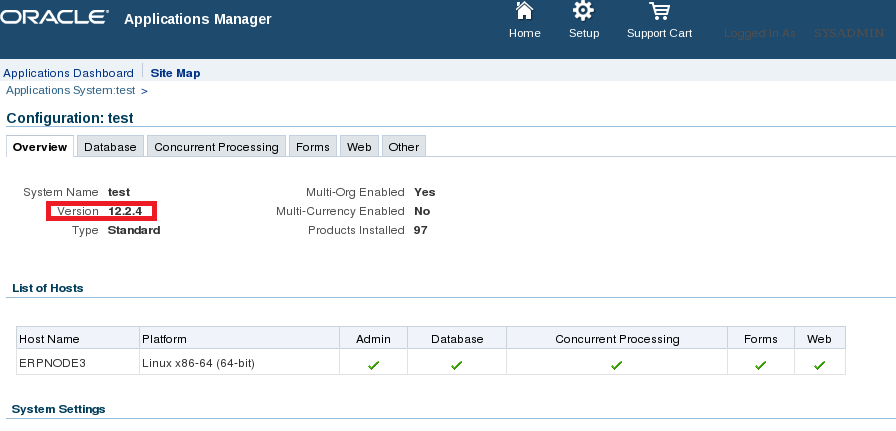
- Verify the version of applications after upgrade:


Post Upgrade:


- Install online help patch "17919162" using adop

- verify all application services are up and running

- check the status of managed serves


All manged servers are up and running. If you have any queries/comments then update me. Happy upgrade...  :)